Your Mac, mapped. Know your apps. Updates, security, and background processes. All in one native Mac app.

Your Mac, mapped. Know your apps. Updates, security, and background processes. All in one native Mac app.

Your Mac, mapped. Know your apps. Updates, security, and background processes. All in one native Mac app.

macOS 26 or later$9.99 once. Lifetime access. No subscription.
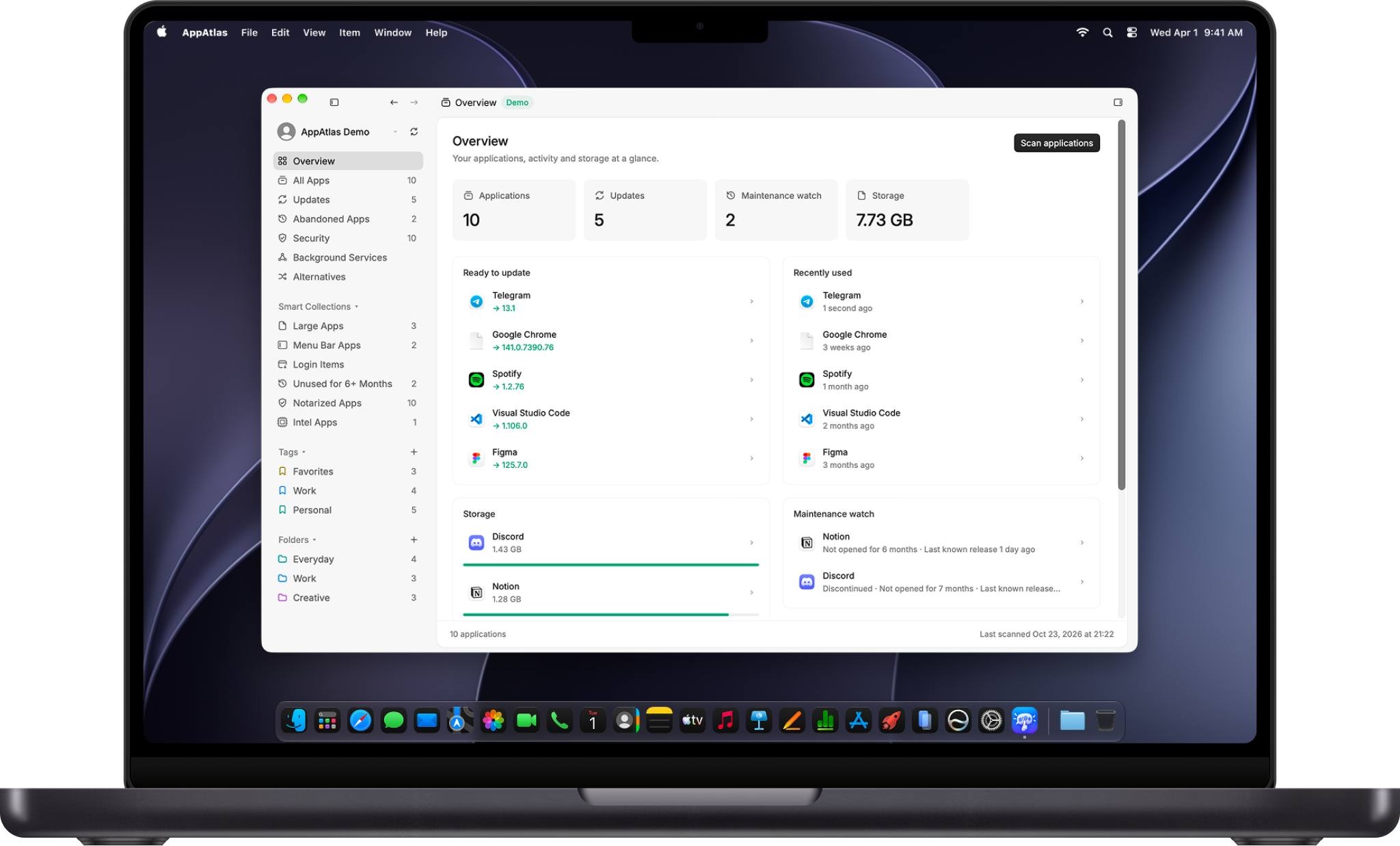
AppAtlas running on a MacBook

From scattered apps to a clearer picture. Find your apps, review the details, and see what needs attention. All in one native Mac app.

Discover. Bring your installed apps into one searchable inventory, with collections and category tags.

Review. Explore available updates, signing information, permissions, and developer activity.

Take a closer look. Open a dedicated app page, inspect its background processes, and explore alternatives.

Your inventory stays on your Mac. Local inventory. Optional online app information. Your installed app list does not need a trip to the cloud.

Your inventory stays on your Mac. Local inventory. Optional online app information. Your installed app list does not need a trip to the cloud.

Your inventory stays on your Mac. Local inventory. Optional online app information. Your installed app list does not need a trip to the cloud.

Your app library. Find installed apps, filter by source and architecture, and browse smart collections.

Your app library. Find installed apps, filter by source and architecture, and browse smart collections.

Local by design. Your inventory stays on your Mac. Optional lookups add information from app catalogs and developers.

Local by design. Your inventory stays on your Mac. Optional lookups add information from app catalogs and developers.

Update intelligence. Compare installed and available versions using supported update feeds and catalog sources.

Update intelligence. Compare installed and available versions using supported update feeds and catalog sources.

Version history. Explore available release notes and dates, with a badge for the version you have installed.

Version history. Explore available release notes and dates, with a badge for the version you have installed.

A closer look. Open an app’s dedicated page for its description, pictures, and detailed information.

A closer look. Open an app’s dedicated page for its description, pictures, and detailed information.

Find alternatives. Explore recommended apps from related categories and open their details before installing.

Find alternatives. Explore recommended apps from related categories and open their details before installing.

Built around your Mac. Native controls, keyboard shortcuts, and a workspace that feels at home on macOS.

Built around your Mac. Native controls, keyboard shortcuts, and a workspace that feels at home on macOS.

See what is running. Review background process groups and their process counts from an app’s inspector.

See what is running. Review background process groups and their process counts from an app’s inspector.

Security context. Review available signing, notarization, and Gatekeeper information for installed apps.

Security context. Review available signing, notarization, and Gatekeeper information for installed apps.

Permissions at a glance. See available permission information with clear, readable labels and familiar controls.

Permissions at a glance. See available permission information with clear, readable labels and familiar controls.

Keep the details handy. Export your inventory when you need a record of the software installed on your Mac.

Keep the details handy. Export your inventory when you need a record of the software installed on your Mac.

Evidence before assumptions. Review the available maintenance evidence. An old release alone does not mean an app is abandoned.

Evidence before assumptions. Review the available maintenance evidence. An old release alone does not mean an app is abandoned.

Your apps, your decisions. AppAtlas brings the details together. Review updates, permissions, security information, and background processes before deciding what to keep.

One purchase.
Yours for $9.99.

No subscription. A lifetime licence for one active Mac. Move it to another Mac from your account.

$9.99 USD, one time. Valid discount codes can be applied at checkout. Final price and taxes are confirmed before payment.

Questions? Answers.

What does AppAtlas do?

AppAtlas brings your installed software into one native Mac app. Search your inventory and review updates, security information, permissions, background processes, and alternatives.

Will every app show its latest version?

Available information depends on the developer and supported sources. AppAtlas uses supported feeds and catalogs. Missing or ambiguous information stays unavailable instead of being guessed.

Can I explore alternatives?

Yes. Open a recommended app to see its details. Related categories help you find alternatives. Review the app and installation details before proceeding.

Can I see background processes?

AppAtlas groups running processes by app. Open the inspector to see process names and counts. Stop a process only when you are ready for the app to be affected.

Which Macs does it run on?

AppAtlas requires macOS 26 or later. The current direct download is built for Apple silicon Macs.

Is my inventory private?

Your installed application inventory stays on your Mac. Optional online lookups contact app catalogs and developer sources. Metloub Account handles your email license and activation.

How much does AppAtlas cost?

One purchase. $9.99 USD. No subscription. Lifetime access for one active Mac. Move your license from your account. Valid discounts and applicable taxes are confirmed at checkout.