
Home for your visual
inspiration.
A native, local,
and blazing-fast visual
library for designers and
creators.
Home for your visual
inspiration.
A native, local,
and blazing-fast visual
library for designers and
creators.

Home for your visual
inspiration.
A native, local,
and blazing-fast visual
library for designers and
creators.

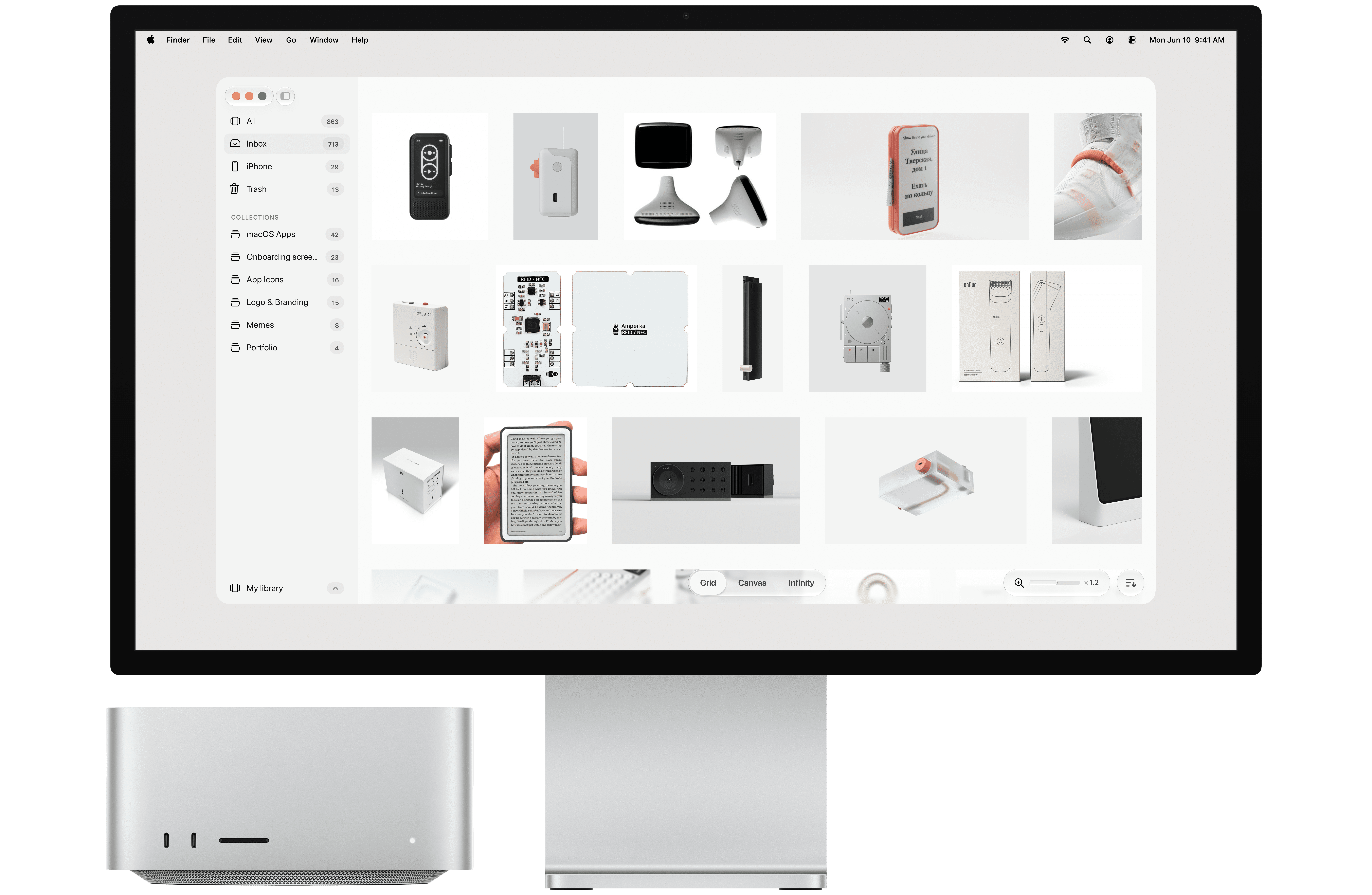
Metloub for Mac displaying an organized visual library of reference images

Three ways to look at your work. Grid for scanning. Canvas for arranging. Infinity for losing yourself in it.

Three ways to look at your work. Grid for scanning. Canvas for arranging. Infinity for losing yourself in it.

Three ways to look at your work. Grid for scanning. Canvas for arranging. Infinity for losing yourself in it.

Grid. Everything, neatly. Zoom out and see a thousand things at once, zoom in and look at one properly.

Canvas. Push things around. Pile the ones that go together, leave gaps where you haven't figured it out yet.

Infinity. No edges, no end. Just drift until something catches your eye.

Yours, and it stays that way. Your files, your folders, your Mac. Metloub fits around what you already have instead of asking you to move it.

Yours, and it stays that way. Your files, your folders, your Mac. Metloub fits around what you already have instead of asking you to move it.

Yours, and it stays that way. Your files, your folders, your Mac. Metloub fits around what you already have instead of asking you to move it.

Collections. Drag items in, drag collections into any order, nest what belongs together.

Collections. Drag items in, drag collections into any order, nest what belongs together.

Local-first, store anywhere. Internal disk, external drive, Dropbox, iCloud. Your library goes where you want it.

Local-first, store anywhere. Internal disk, external drive, Dropbox, iCloud. Your library goes where you want it.

Browser extensions. Right-click any image or video on the web and send it straight to a collection.

Browser extensions. Right-click any image or video on the web and send it straight to a collection.

Menu bar pin. Drop anything onto the icon in your menu bar. It lands in your Inbox.

Menu bar pin. Drop anything onto the icon in your menu bar. It lands in your Inbox.

Connected folders. Browse a folder as fast as your library. Your files stay exactly where they are.

Connected folders. Browse a folder as fast as your library. Your files stay exactly where they are.

Endlessly customizable. Spacing, corners, backgrounds, light or dark. Make it look like yours.

Endlessly customizable. Spacing, corners, backgrounds, light or dark. Make it look like yours.

Fully native, not a web gimmick. Metloub speaks the rest of your Mac fluently. Built on Apple's own frameworks.

Fully native, not a web gimmick. Metloub speaks the rest of your Mac fluently. Built on Apple's own frameworks.

Blazing fast. Scroll, zoom, and drag through thousands of items without a single hitch. Speed you feel in the first ten seconds.

Blazing fast. Scroll, zoom, and drag through thousands of items without a single hitch. Speed you feel in the first ten seconds.

Bring your Eagle library. Connect what you already have and pick up where you left off. Nothing to rebuild.

Bring your Eagle library. Connect what you already have and pick up where you left off. Nothing to rebuild.

iOS companion App. Save anything on the go and it's waiting in your Inbox when you sit down.

iOS companion App. Save anything on the go and it's waiting in your Inbox when you sit down.

COMING FALL '26

Links. Save URLs, articles, references, and shop pages, and organize them in collections.

Links. Save URLs, articles, references, and shop pages, and organize them in collections.

MCP support. Teach your agent your taste.

MCP support. Teach your agent your taste.

Your feedback, next week's feature. If you have any feedback, press Cmd+Opt+F in the app to send it straight into our workflow, where agents help triage and turn it into real product improvements.

Questions? Answers.

What is Metloub for Mac?

Metloub is a native Mac app for collecting visual inspiration. Keep reference images, videos, and links together, organize them into collections, and explore your library in a grid, on a canvas, or in Infinity view. It is built for designers, artists, and anyone who saves things to come back to.

Can I try Metloub before buying?

Yes. Download Metloub and start a 7-day free trial with up to 5 boards. Enter your email in the app to begin. A license removes the trial limits. Download Metloub for Mac.

Is Metloub a subscription?

No. Metloub is a one-time purchase of $39 USD. Your license includes one year of updates; you can keep using the versions covered by your license after that year. Renew only when you want access to newer versions. View pricing and buy Metloub.

Which Macs can run Metloub?

Metloub requires macOS 14 Sonoma or later. Download the app to try it on your Mac before purchasing. Metloub is a native macOS app, rather than a website wrapped in a desktop window.

What can I save in Metloub?

Collect images, videos, and web links, including articles, product pages, and design references. Use collections to bring related material together, and choose the view that suits the work: a grid for browsing, a canvas for arranging ideas, or Infinity for exploring.

Where are my files stored?

Your library stays in folders on your Mac. Metloub can also connect to existing folders, so you can work with files where you already keep them. You control your storage and backups; Metloub does not require you to upload your visual library to an Metloub cloud service.

How can I share my Metloub library with my team?

Store your Metloub library in a cloud folder and share it with your team. Dropbox, Google Drive, iCloud, or another cloud service that syncs files to your Mac can handle sharing. Give your teammates access to the library file through that service, and each person can open the shared library in Metloub on their Mac. It is a simple way to keep project references and inspiration available to everyone.

Can I sync my Metloub library between Macs?

Yes. Keep your Metloub library in a cloud folder to use it across your Macs. Save the library file in Dropbox, Google Drive, iCloud, or another cloud service that syncs files between devices, then open that synced library in Metloub on each Mac. Your cloud service handles the syncing, so you can move between your desktop and laptop with the same library.

Can I use Metloub offline?

You can browse and organize files stored locally on your Mac without an internet connection. Starting a trial, activating a license, downloading updates, and opening web links need internet access. Files in a cloud-synced folder must be downloaded to your Mac to be available offline.

Can I use my existing Eagle library?

Yes. Metloub can connect to an existing Eagle library, so you do not have to start your collection again. Keep a backup before making changes to any library. See the guide to switching from Eagle or compare Metloub and Eagle.

Can I save inspiration from my browser?

Yes. Add to Metloub is available for Safari and Chrome, so you can save images, videos, and links while browsing. The Safari extension is included with Metloub: open Settings → Extensions in the app to enable it in Safari. Install the Chrome extension from the Chrome Web Store. Both send what you save to your Metloub library. Download Chrome extension.

How does Metloub work with AI assistants?

Metloub supports the Model Context Protocol (MCP), which lets compatible AI assistants work with your library through the tools Metloub exposes. Connect an assistant in Metloub’s MCP settings to bring your references into your workflow. Any content you share with an external assistant is also subject to that provider’s privacy practices.

Does Metloub collect analytics?

Your library is local. The app uses services for licensing, updates, and usage analytics; the website loads Google Analytics only if you accept analytics cookies. Read the privacy policy for the details and controls.

How do I get updates or ask for help?

Metloub checks for updates in the app. You can also read the release notes to see what has changed. For a bug, license question, or feature request, email Alexey. Include your macOS version, Metloub version, and what happened so it is easier to help.

Download Metloub. Enter your email to download Metloub for Mac.

macOS 14.0 or later